LET'S MEET
→





AI Integrated Workflow
CASE STUDY
Overview
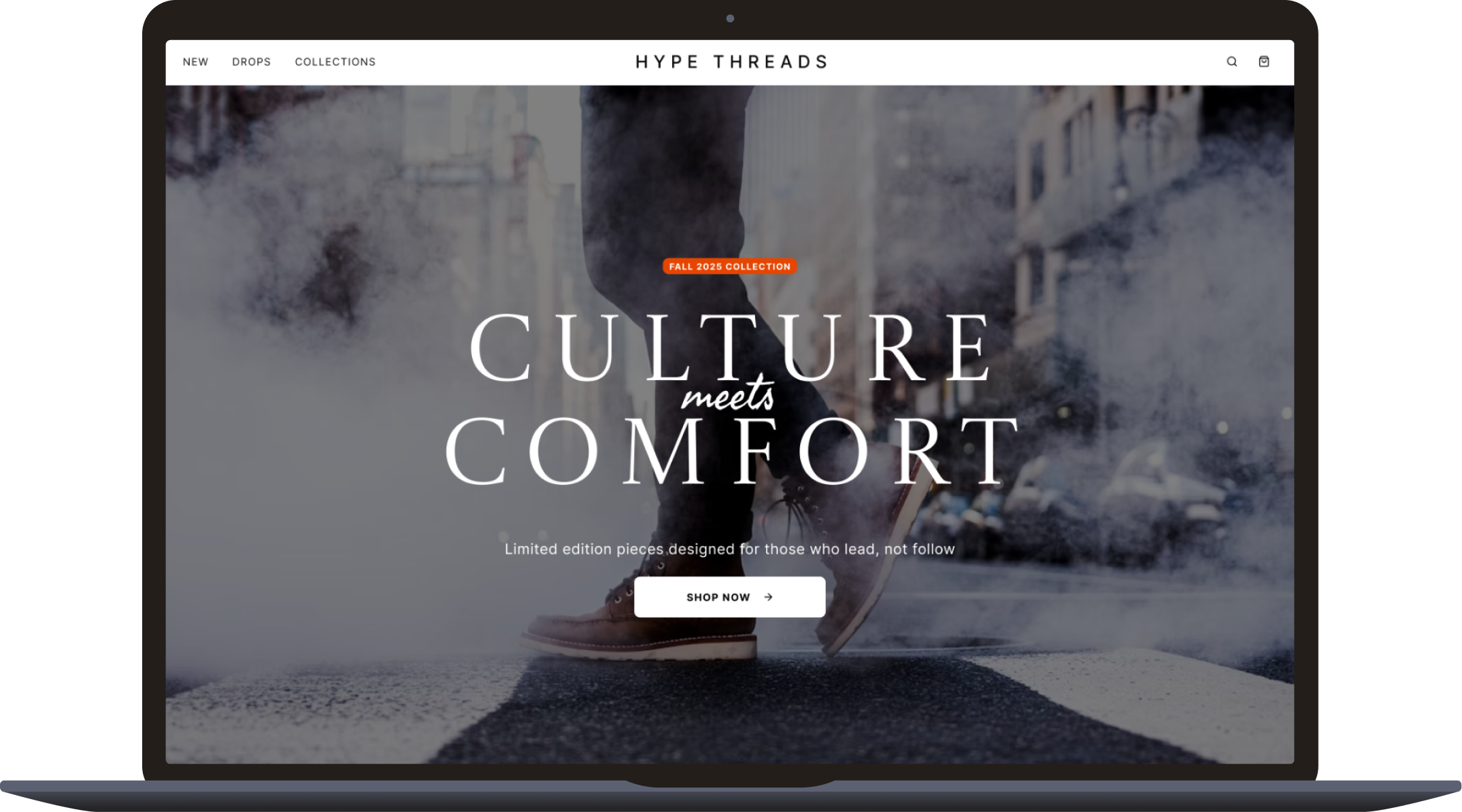
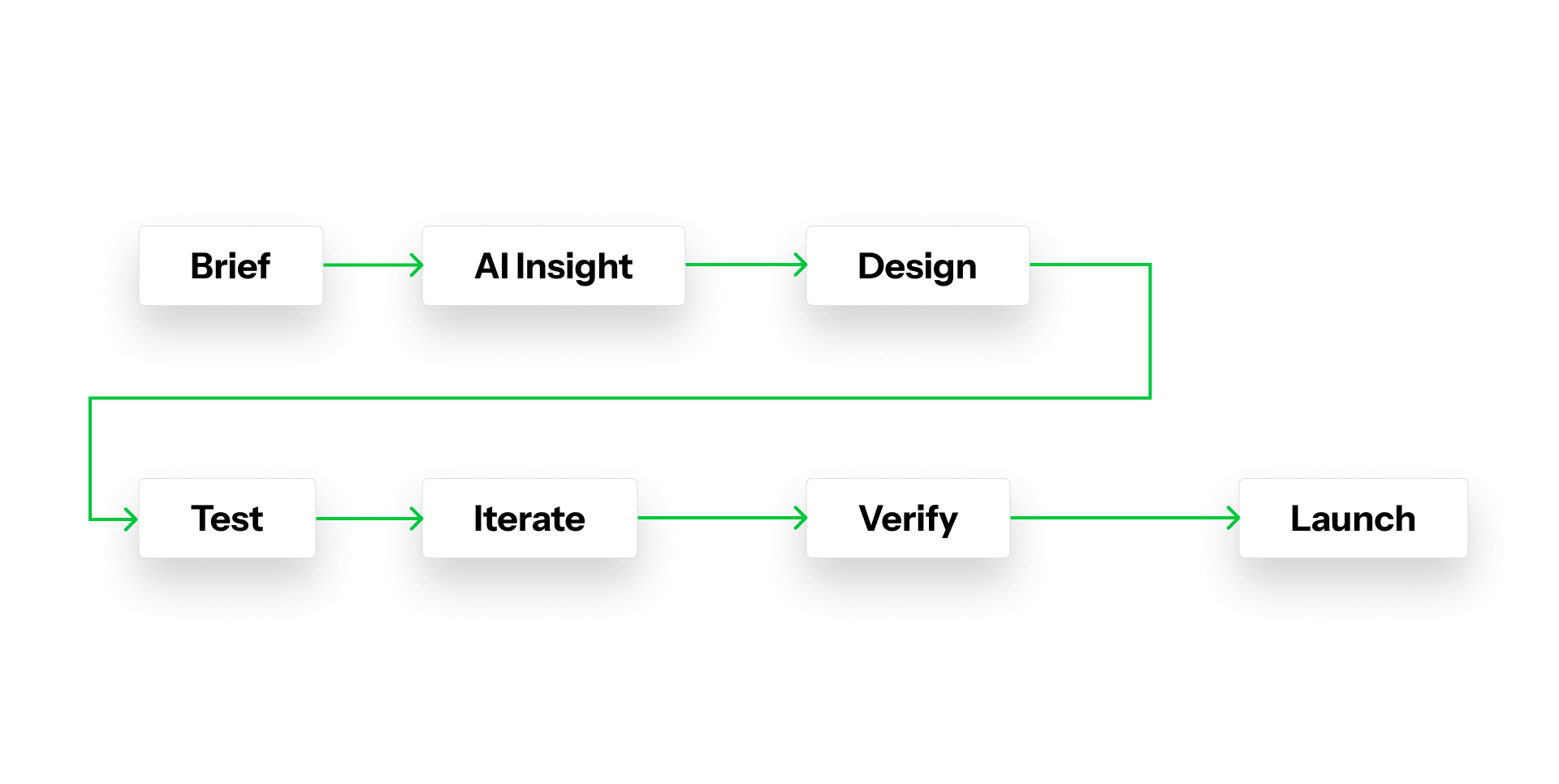
AI has become an essential part of how I design, plan, and validate ideas. I use it as both a collaborator and a tool for efficiency, helping me think faster, test smarter, and make more informed design decisions. This case study walks through how I integrate AI at each stage of the design process, from research to iteration.
Framing the Problem
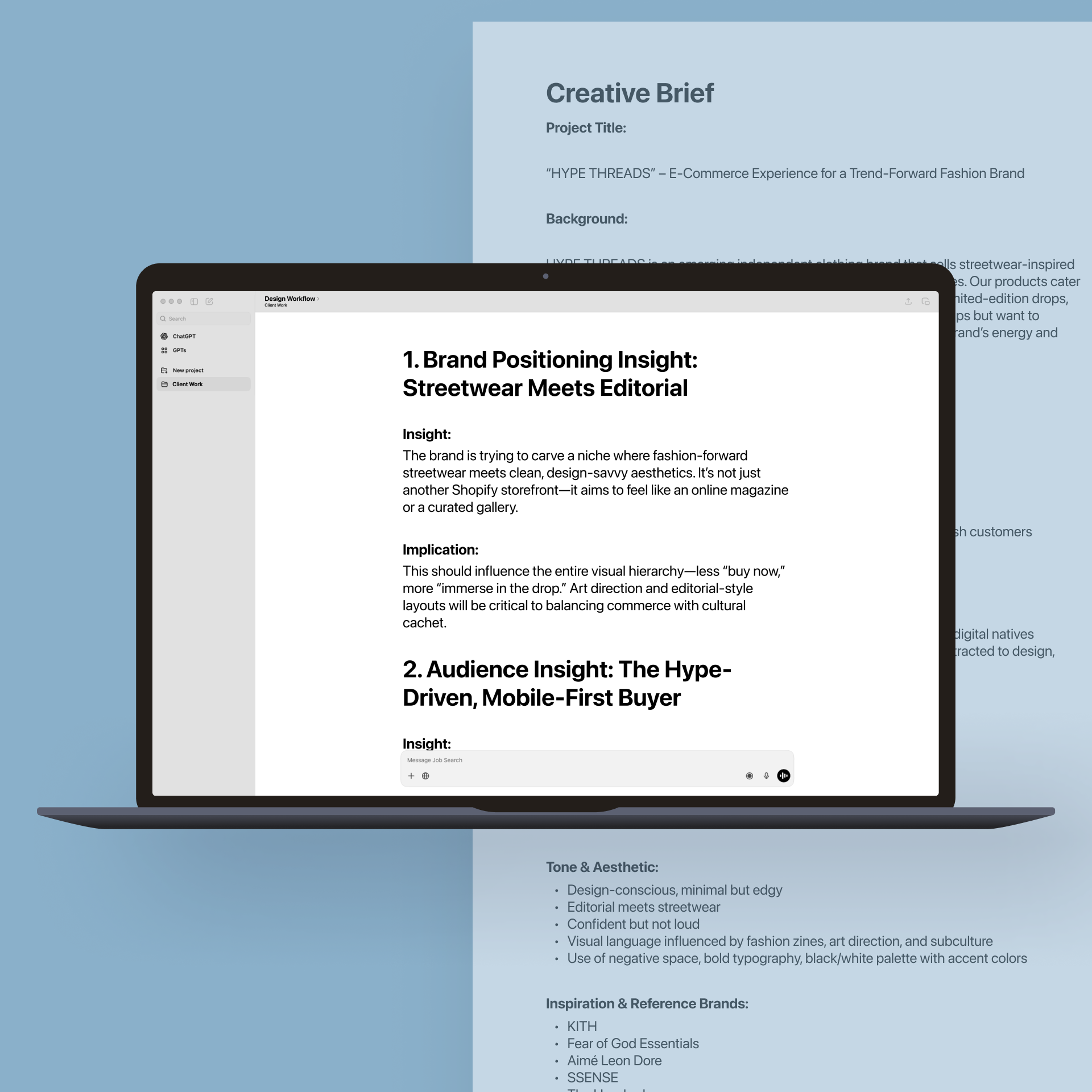
Analyzing the Creative Brief
I start each project by feeding the creative brief into ChatGPT to surface insights I might miss during the first read. The goal is to uncover hidden assumptions, challenge my thinking, and highlight unclear problem areas before jumping into design.

Eli
The Aesthetic-Driven Minimalist
Eli
The Aesthetic-Driven Minimalist

Jordan
The Hype Cycle Shopper
Jordan
The Hype Cycle Shopper

Maya
The Trend-Seeking Creative


Maya
The Trend-Seeking Creative

Profile
Age: 24
Location: Brooklyn, NY
Profession: Junior Art Director
Tech Comfort Level: High (uses design software, fluent in mobile UX)
Motivations
Wants to express individuality through curated fashion
Shops from brands that align with her aesthetic values and design taste
Pain Points
Frustrated by generic e-commerce sites that feel disconnected from the brand’s creative voice
Feels overwhelmed by poorly organized product catalogs with no visual curation
Profile
Age: 19
Location: Los Angeles, CA
Profession: College Student / Streetwear Reseller
Tech Comfort Level: Very High
Motivations
Wants to be first to grab pieces before they sell out
Shops to flex online and flip limited pieces when needed
Pain Points
Misses drops due to unclear launch timing or poor checkout UX
Gets annoyed when sites don’t show “sold out” or stock level info clearly
Profile
Age: 31
Location: Portland, OR
Profession: UX Designer at a fintech startup
Tech Comfort Level: Expert
Motivations
Shops to support brands that “get it” visually and culturally
Will abandon cart if site feels clunky or “off-brand”
Pain Points
Distrusts ecom sites that feel overdesigned or too commercial
Gets turned off by brands that don’t match the lifestyle they project on social
Research and Validation
Building Personas with AI
I use ChatGPT to simulate user personas based on real demographic and behavioral data. It helps me identify different motivations and friction points early. These personas become the foundation for testing scenarios later in the process.
Simulated User Testing
Before going live with real participants, I use ChatGPT to run simulated user testing sessions. I create hypothetical tasks and ask AI to respond as various persona types. This lets me spot usability issues early and refine test plans before real-world testing.
Using AI to Distill and Share Insights
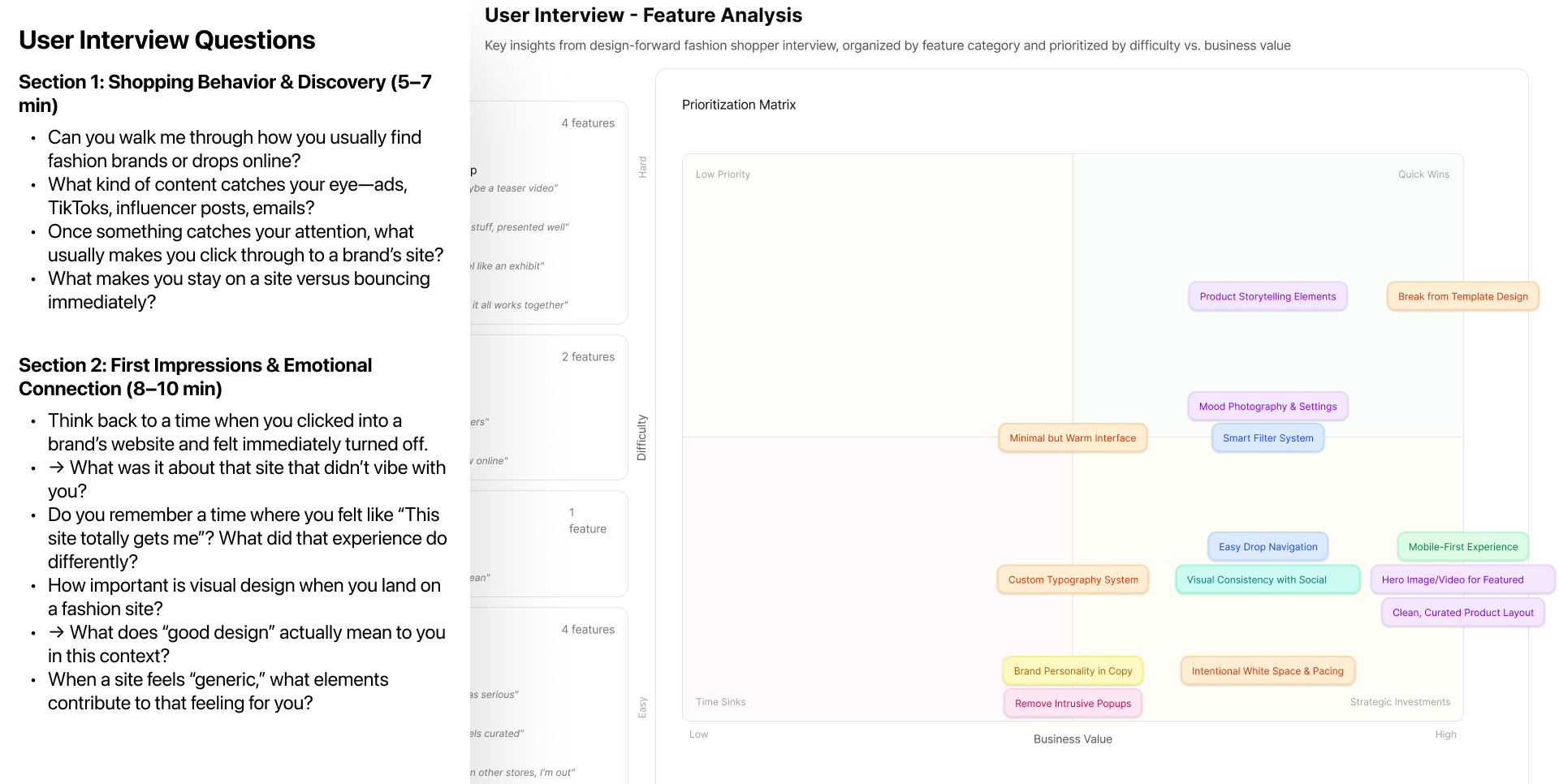
AI helps me make sense of the information gathered along the way. I use AI tools to distill user research notes, surfacing recurring themes and actionable ideas. This creates alignment across disciplines and ensures that design decisions inform both data and collaboration. I also use it to summarize analytics from Google Analytics and combine those findings with qualitative insights from the user research.
Research Synthesis and Competitive Analysis
Analyzing Real User Tests
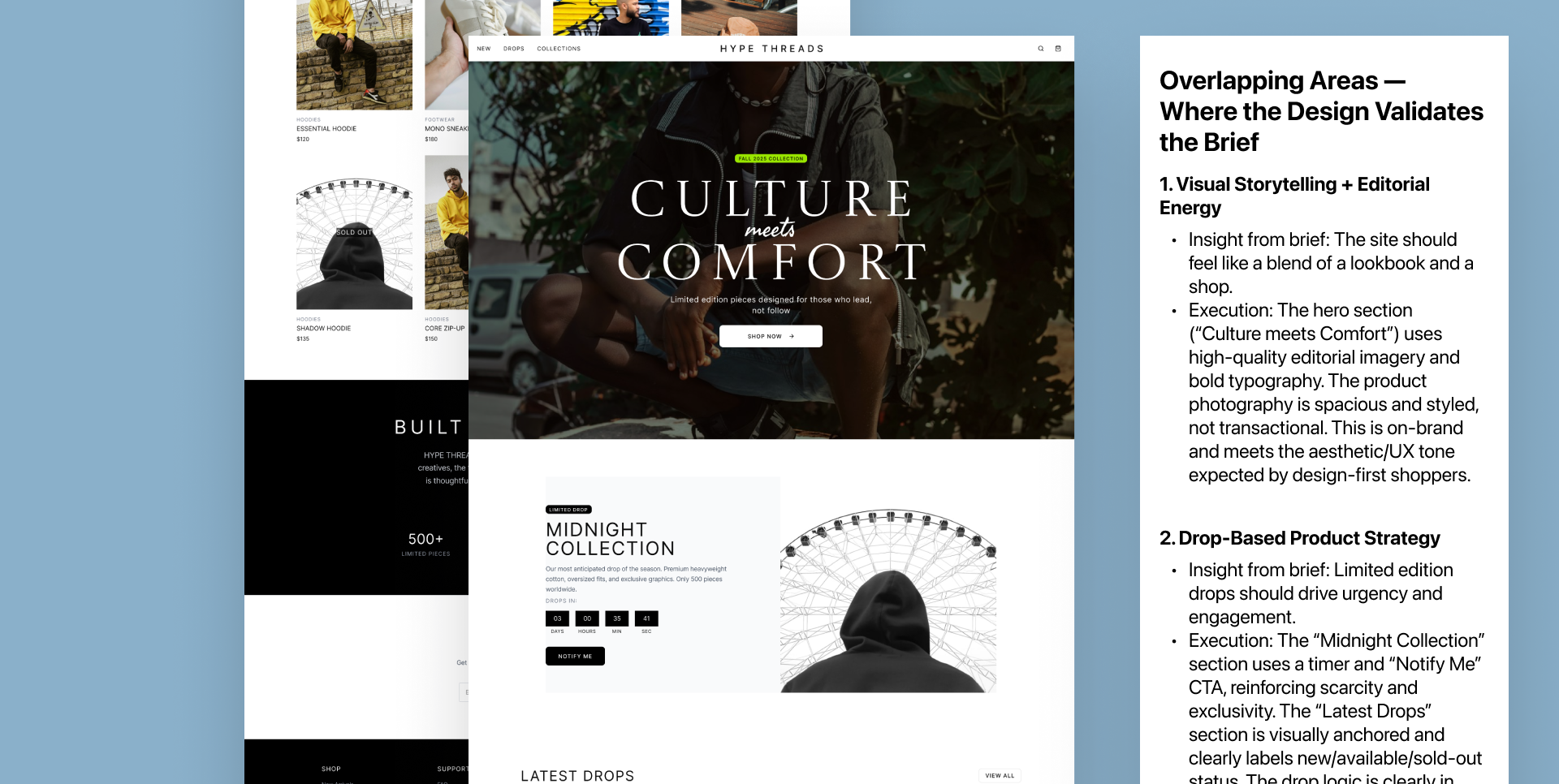
After conducting real user tests, I use ChatGPT to help analyze the data. It summarizes qualitative insights, identifies patterns, and validates whether early assumptions were accurate.
Competitive Research Support
Once I complete a competitor review, I run my notes through ChatGPT to validate findings and identify research gaps. This step ensures my analysis is thorough and balanced.
Concept and Design Development
AI-Enhanced Wireframe Review
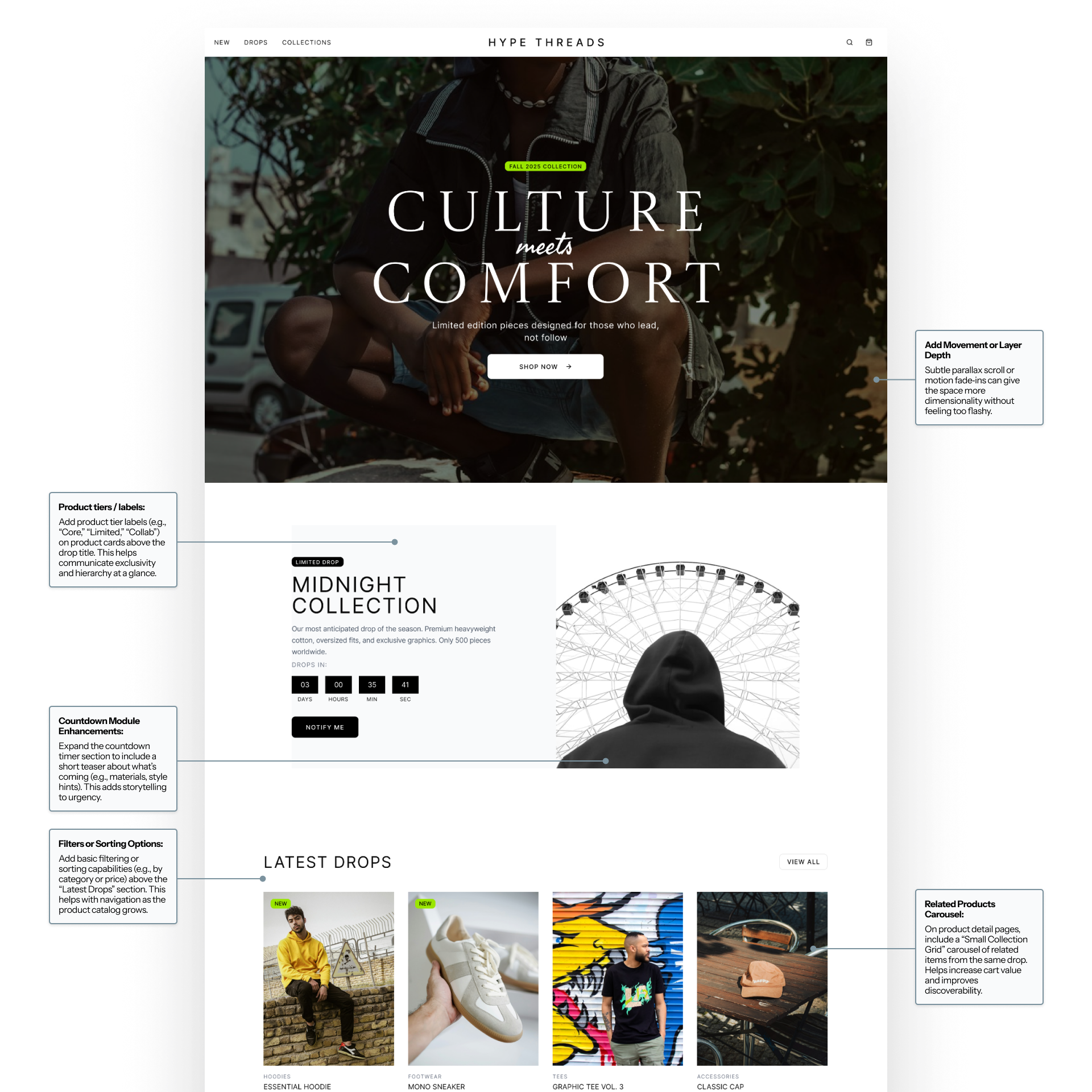
I run initial wireframes through ChatGPT to get feedback on user flows, hierarchy, and accessibility. It helps surface structural issues early and supports a smoother transition to prototype.
Simulated Eye Tracking with Attention Insight
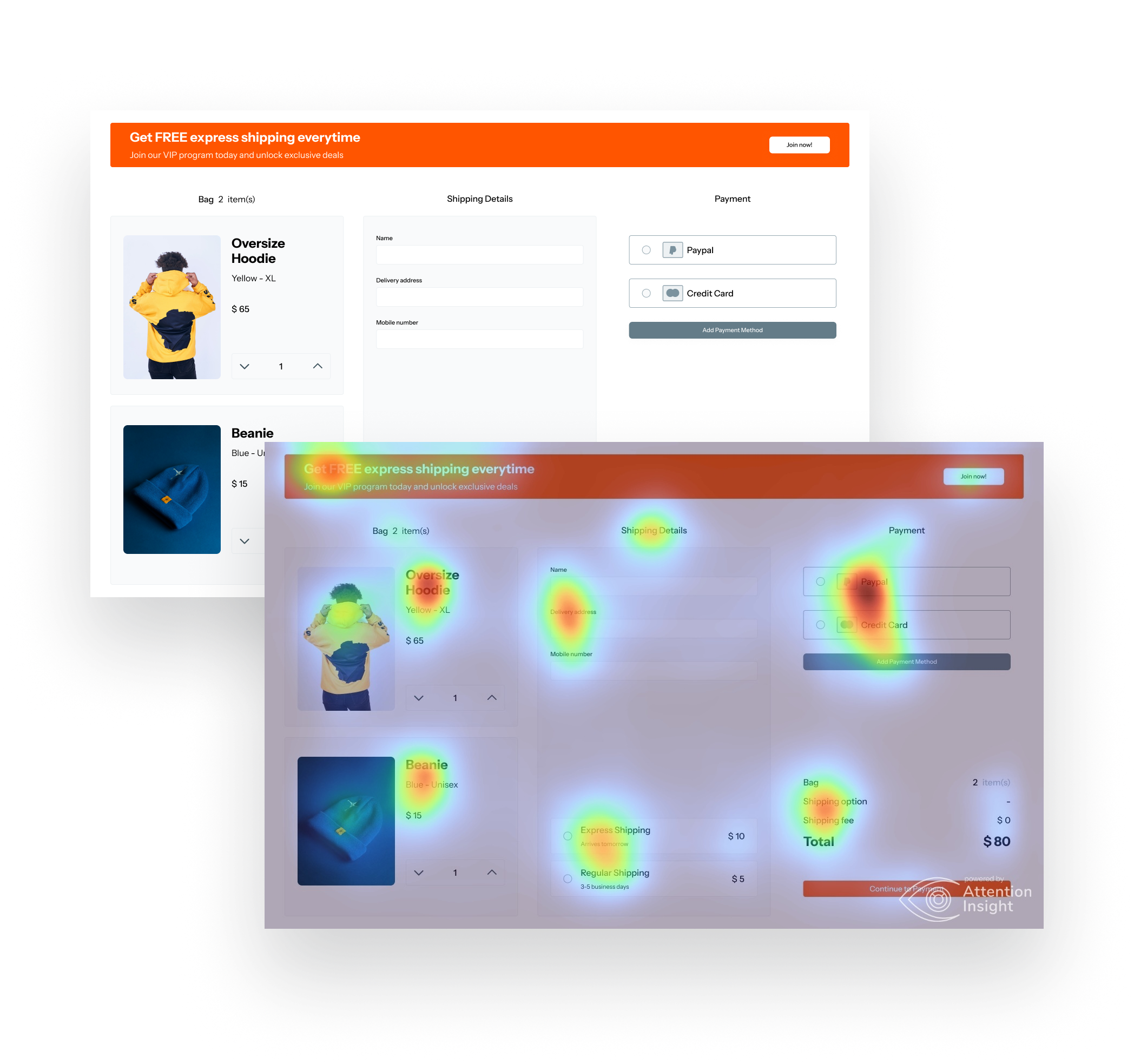
Using Attention Insight, I generate predictive heatmaps to test how users might visually interact with designs. This gives me a chance to iterate before launching live usability tests.
Refinement and Ethical Oversight
Ensuring Accuracy and Reducing Bias
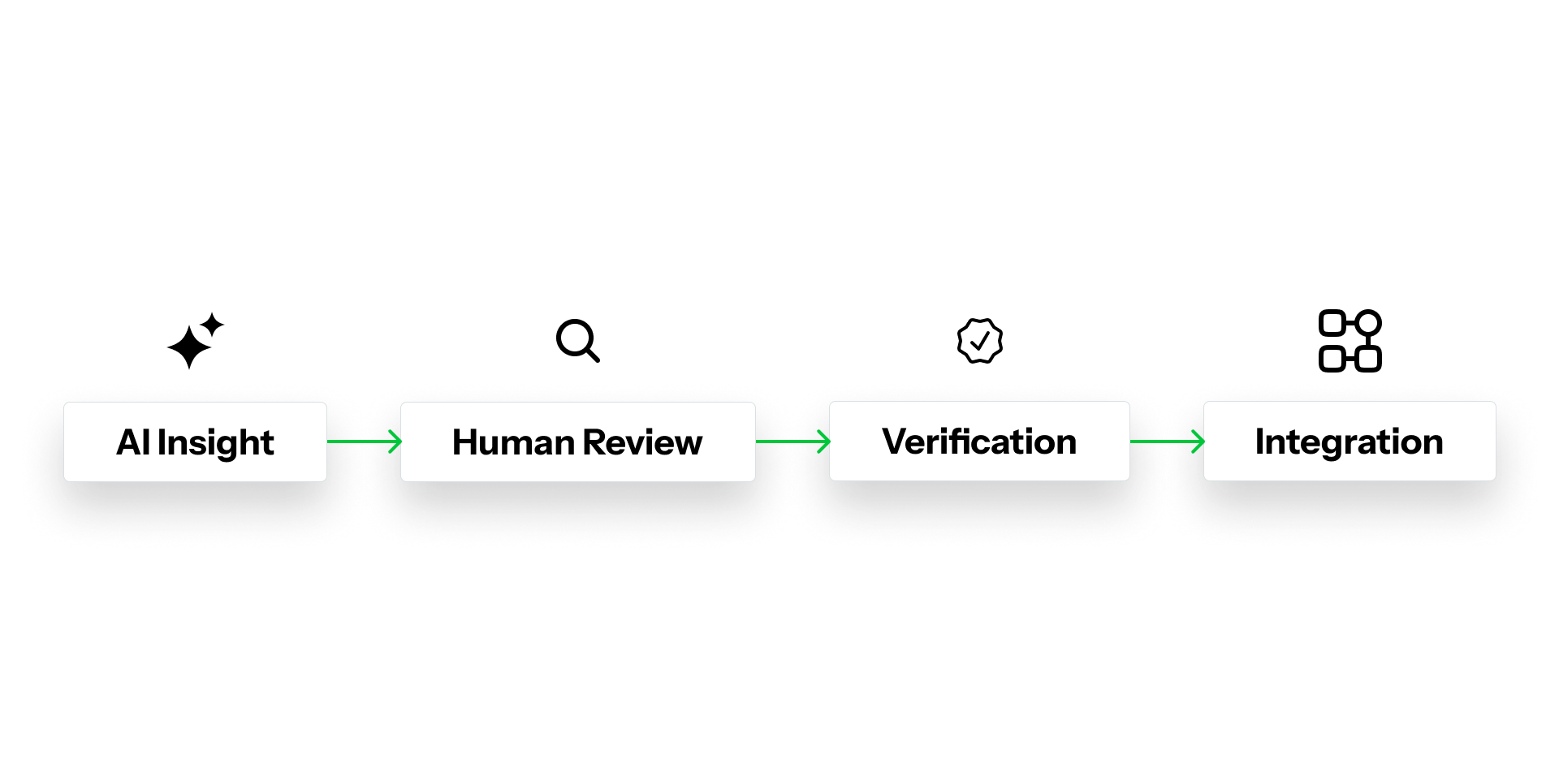
AI tools are powerful but not always accurate. I run AI-generated insights through a verification process, cross-checking data against human feedback and source material. This helps prevent bias, misinformation, and over-reliance on machine-generated conclusions. It’s an extra step that keeps design grounded in truth and context.
Rapid Prototyping and Iteration
Using Figma Make for Prototyping
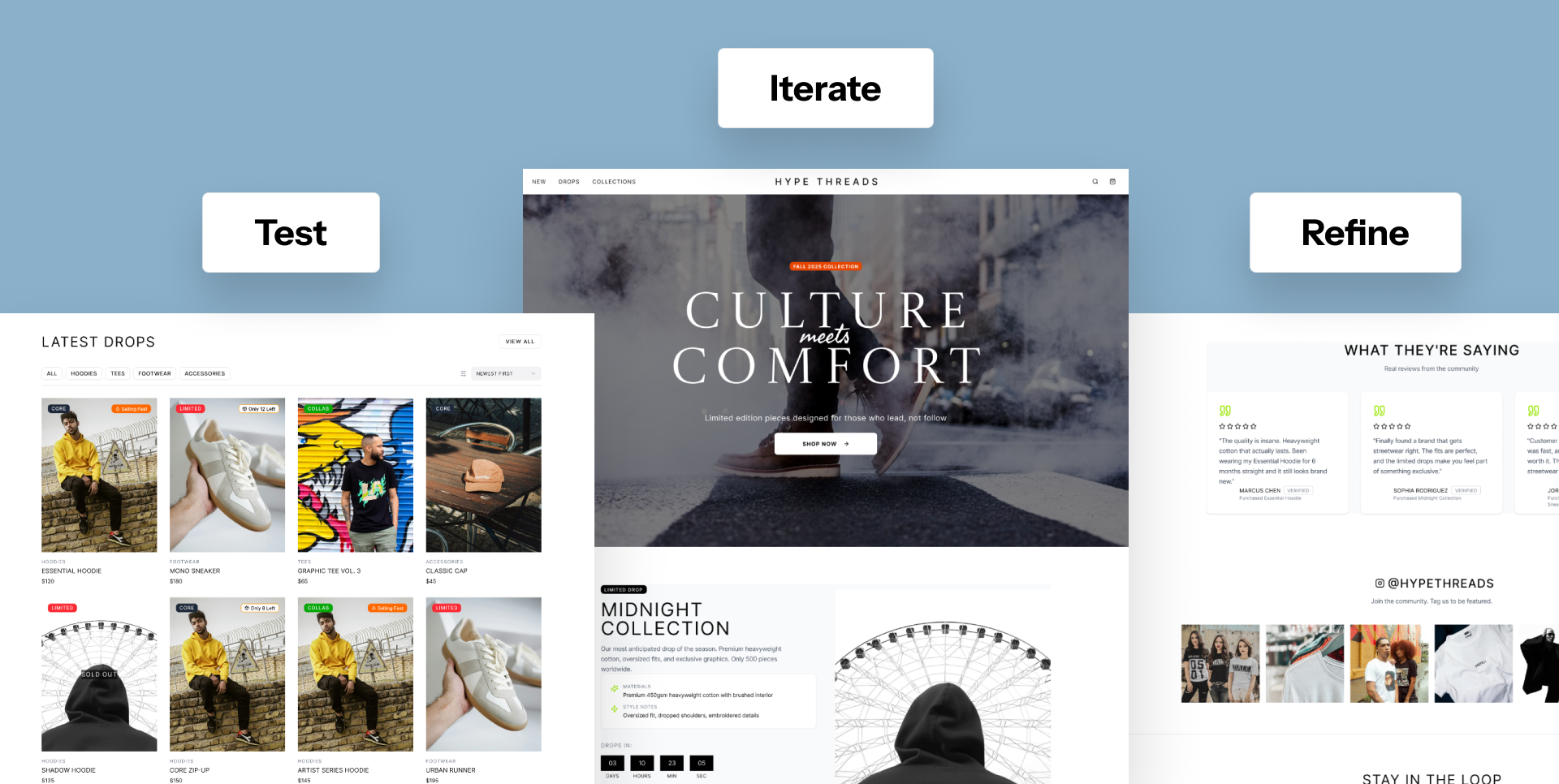
I use Figma Make to quickly build and test live prototypes. This allows for faster iteration and real-time feedback during field testing. The platform helps validate interactions in context and ensures the experience feels fluid and intuitive.
Copy and Tone Optimization
Once design flows are in place, I use ChatGPT to refine interface copy, micro-interactions, and tone of voice. This ensures that the language feels consistent with the brand and clear to the user.
Reflection and Next Steps
AI as a Design Partner
Integrating AI into my workflow has made my process faster and more informed. It helps me test assumptions early, find blind spots, and refine ideas with more precision. AI enhances creativity and allows insight before live testing, while human intuition and empathy remain at the center of every decision.
Next Project


Home
Product Design Case Study
Visual Design Case Study
Work
Other
VIEW FULL SKILLSET LIST
→
GET IN TOUCH
Bookings
CONTACT
ryan@madecollective.co
SOCIAL


LET'S MEET
→




AI Integrated Workflow
CASE STUDY
Overview
AI has become an essential part of how I design, plan, and validate ideas. I use it as both a collaborator and a tool for efficiency, helping me think faster, test smarter, and make more informed design decisions. This case study walks through how I integrate AI at each stage of the design process, from research to iteration.
Framing the Problem
Analyzing the Creative Brief
I start each project by feeding the creative brief into ChatGPT to surface insights I might miss during the first read. The goal is to uncover hidden assumptions, challenge my thinking, and highlight unclear problem areas before jumping into design.
Eli
The Aesthetic-Driven Minimalist
Eli
The Aesthetic-Driven Minimalist
Jordan
The Hype Cycle Shopper
Jordan
The Hype Cycle Shopper
Maya
The Trend-Seeking Creative
Maya
The Trend-Seeking Creative
Profile
Age: 24
Location: Brooklyn, NY
Profession: Junior Art Director
Tech Comfort Level: High (uses design software, fluent in mobile UX)
Motivations
Wants to express individuality through curated fashion
Shops from brands that align with her aesthetic values and design taste
Pain Points
Frustrated by generic e-commerce sites that feel disconnected from the brand’s creative voice
Feels overwhelmed by poorly organized product catalogs with no visual curation
Profile
Age: 19
Location: Los Angeles, CA
Profession: College Student / Streetwear Reseller
Tech Comfort Level: Very High
Motivations
Wants to be first to grab pieces before they sell out
Shops to flex online and flip limited pieces when needed
Pain Points
Misses drops due to unclear launch timing or poor checkout UX
Gets annoyed when sites don’t show “sold out” or stock level info clearly
Profile
Age: 31
Location: Portland, OR
Profession: UX Designer at a fintech startup
Tech Comfort Level: Expert
Motivations
Shops to support brands that “get it” visually and culturally
Will abandon cart if site feels clunky or “off-brand”
Pain Points
Distrusts ecom sites that feel overdesigned or too commercial
Gets turned off by brands that don’t match the lifestyle they project on social
Research and Validation
Building Personas with AI
I use ChatGPT to simulate user personas based on real demographic and behavioral data. It helps me identify different motivations and friction points early. These personas become the foundation for testing scenarios later in the process.
Simulated User Testing
Before going live with real participants, I use ChatGPT to run simulated user testing sessions. I create hypothetical tasks and ask AI to respond as various persona types. This lets me spot usability issues early and refine test plans before real-world testing.
Using AI to Distill and Share Insights
AI helps me make sense of the information gathered along the way. I use AI tools to distill user research notes, surfacing recurring themes and actionable ideas. This creates alignment across disciplines and ensures that design decisions inform both data and collaboration. I also use it to summarize analytics from Google Analytics and combine those findings with qualitative insights from the user research.
Research Synthesis and Competitive Analysis
Analyzing Real User Tests
After conducting real user tests, I use ChatGPT to help analyze the data. It summarizes qualitative insights, identifies patterns, and validates whether early assumptions were accurate.
Competitive Research Support
Once I complete a competitor review, I run my notes through ChatGPT to validate findings and identify research gaps. This step ensures my analysis is thorough and balanced.
Concept and Design Development
AI-Enhanced Wireframe Review
I run initial wireframes through ChatGPT to get feedback on user flows, hierarchy, and accessibility. It helps surface structural issues early and supports a smoother transition to prototype.
Simulated Eye Tracking with Attention Insight
Using Attention Insight, I generate predictive heatmaps to test how users might visually interact with designs. This gives me a chance to iterate before launching live usability tests.
Refinement and Ethical Oversight
Ensuring Accuracy and Reducing Bias
AI tools are powerful but not always accurate. I run AI-generated insights through a verification process, cross-checking data against human feedback and source material. This helps prevent bias, misinformation, and over-reliance on machine-generated conclusions. It’s an extra step that keeps design grounded in truth and context.
Rapid Prototyping and Iteration
Using Figma Make for Prototyping
I use Figma Make to quickly build and test live prototypes. This allows for faster iteration and real-time feedback during field testing. The platform helps validate interactions in context and ensures the experience feels fluid and intuitive.
Copy and Tone Optimization
Once design flows are in place, I use ChatGPT to refine interface copy, micro-interactions, and tone of voice. This ensures that the language feels consistent with the brand and clear to the user.
Reflection and Next Steps
AI as a Design Partner
Integrating AI into my workflow has made my process faster and more informed. It helps me test assumptions early, find blind spots, and refine ideas with more precision. AI enhances creativity and allows insight before live testing, while human intuition and empathy remain at the center of every decision.
Next Project

Home
Product Design Case Study
Visual Design Case Study
Work
Other
VIEW FULL SKILLSET LIST
→
GET IN TOUCH
Bookings
CONTACT
ryan@madecollective.co
SOCIAL


Home
Case Studies
Work
Other
LET'S MEET

AI Integrated Workflow
CASE STUDY
Overview
AI has become an essential part of how I design, plan, and validate ideas. I use it as both a collaborator and a tool for efficiency, helping me think faster, test smarter, and make more informed design decisions. This case study walks through how I integrate AI at each stage of the design process, from research to iteration.
Framing the Problem
Analyzing the Creative Brief
I start each project by feeding the creative brief into ChatGPT to surface insights I might miss during the first read. The goal is to uncover hidden assumptions, challenge my thinking, and highlight unclear problem areas before jumping into design.
Eli
The Aesthetic-Driven Minimalist
Eli
The Aesthetic-Driven Minimalist
Jordan
The Hype Cycle Shopper
Jordan
The Hype Cycle Shopper
Maya
The Trend-Seeking Creative
Maya
The Trend-Seeking Creative
Jordan
The Hype Cycle Shopper
Profile
Age: 24
Location: Brooklyn, NY
Profession: Junior Art Director
Tech Comfort Level: High (uses design software, fluent in mobile UX)
Motivations
Wants to express individuality through curated fashion
Shops from brands that align with her aesthetic values and design taste
Pain Points
Frustrated by generic e-commerce sites that feel disconnected from the brand’s creative voice
Feels overwhelmed by poorly organized product catalogs with no visual curation
Profile
Age: 19
Location: Los Angeles, CA
Profession: College Student / Streetwear Reseller
Tech Comfort Level: Very High
Motivations
Wants to be first to grab pieces before they sell out
Shops to flex online and flip limited pieces when needed
Pain Points
Misses drops due to unclear launch timing or poor checkout UX
Gets annoyed when sites don’t show “sold out” or stock level info clearly
Profile
Age: 31
Location: Portland, OR
Profession: UX Designer at a fintech startup
Tech Comfort Level: Expert
Motivations
Shops to support brands that “get it” visually and culturally
Will abandon cart if site feels clunky or “off-brand”
Pain Points
Distrusts ecom sites that feel overdesigned or too commercial
Gets turned off by brands that don’t match the lifestyle they project on social
Research and Validation
Building Personas with AI
I use ChatGPT to simulate user personas based on real demographic and behavioral data. It helps me identify different motivations and friction points early. These personas become the foundation for testing scenarios later in the process.
Simulated User Testing
Before going live with real participants, I use ChatGPT to run simulated user testing sessions. I create hypothetical tasks and ask AI to respond as various persona types. This lets me spot usability issues early and refine test plans before real-world testing.
Using AI to Distill and Share Insights
AI helps me make sense of the information gathered along the way. I use AI tools to distill user research notes, surfacing recurring themes and actionable ideas. This creates alignment across disciplines and ensures that design decisions inform both data and collaboration. I also use it to summarize analytics from Google Analytics and combine those findings with qualitative insights from the user research.
Research Synthesis and Competitive Analysis
Analyzing Real User Tests
After conducting real user tests, I use ChatGPT to help analyze the data. It summarizes qualitative insights, identifies patterns, and validates whether early assumptions were accurate.
Competitive Research Support
Once I complete a competitor review, I run my notes through ChatGPT to validate findings and identify research gaps. This step ensures my analysis is thorough and balanced.
Concept and Design Development
AI-Enhanced Wireframe Review
I run initial wireframes through ChatGPT to get feedback on user flows, hierarchy, and accessibility. It helps surface structural issues early and supports a smoother transition to prototype.
Simulated Eye Tracking with Attention Insight
Using Attention Insight, I generate predictive heatmaps to test how users might visually interact with designs. This gives me a chance to iterate before launching live usability tests.
Refinement and Ethical Oversight
Ensuring Accuracy and Reducing Bias
AI tools are powerful but not always accurate. I run AI-generated insights through a verification process, cross-checking data against human feedback and source material. This helps prevent bias, misinformation, and over-reliance on machine-generated conclusions. It’s an extra step that keeps design grounded in truth and context.
Rapid Prototyping and Iteration
Using Figma Make for Prototyping
I use Figma Make to quickly build and test live prototypes. This allows for faster iteration and real-time feedback during field testing. The platform helps validate interactions in context and ensures the experience feels fluid and intuitive.
Copy and Tone Optimization
Once design flows are in place, I use ChatGPT to refine interface copy, micro-interactions, and tone of voice. This ensures that the language feels consistent with the brand and clear to the user.
Reflection and Next Steps
AI as a Design Partner
Integrating AI into my workflow has made my process faster and more informed. It helps me test assumptions early, find blind spots, and refine ideas with more precision. AI enhances creativity and allows insight before live testing, while human intuition and empathy remain at the center of every decision.
Next Project

Home
Product Design Case Study
Visual Design Case Study
Work
Other
VIEW FULL SKILLSET LIST
→
GET IN TOUCH
Bookings
CONTACT
ryan@madecollective.co
SOCIAL

Home
Case Studies
Work
Other
LET'S MEET
AI Integrated Workflow
CASE STUDY
Overview
AI has become an essential part of how I design, plan, and validate ideas. I use it as both a collaborator and a tool for efficiency, helping me think faster, test smarter, and make more informed design decisions. This case study walks through how I integrate AI at each stage of the design process, from research to iteration.
Framing the Problem
Analyzing the Creative Brief
I start each project by feeding the creative brief into ChatGPT to surface insights I might miss during the first read. The goal is to uncover hidden assumptions, challenge my thinking, and highlight unclear problem areas before jumping into design.
Eli
The Aesthetic-Driven Minimalist
Eli
The Aesthetic-Driven Minimalist
Jordan
The Hype Cycle Shopper
Jordan
The Hype Cycle Shopper
Maya
The Trend-Seeking Creative
Maya
The Trend-Seeking Creative
Jordan
The Hype Cycle Shopper
Profile
Age: 24
Location: Brooklyn, NY
Profession: Junior Art Director
Tech Comfort Level: High (uses design software, fluent in mobile UX)
Motivations
Wants to express individuality through curated fashion
Shops from brands that align with her aesthetic values and design taste
Pain Points
Frustrated by generic e-commerce sites that feel disconnected from the brand’s creative voice
Feels overwhelmed by poorly organized product catalogs with no visual curation
Profile
Age: 19
Location: Los Angeles, CA
Profession: College Student / Streetwear Reseller
Tech Comfort Level: Very High
Motivations
Wants to be first to grab pieces before they sell out
Shops to flex online and flip limited pieces when needed
Pain Points
Misses drops due to unclear launch timing or poor checkout UX
Gets annoyed when sites don’t show “sold out” or stock level info clearly
Profile
Age: 31
Location: Portland, OR
Profession: UX Designer at a fintech startup
Tech Comfort Level: Expert
Motivations
Shops to support brands that “get it” visually and culturally
Will abandon cart if site feels clunky or “off-brand”
Pain Points
Distrusts ecom sites that feel overdesigned or too commercial
Gets turned off by brands that don’t match the lifestyle they project on social
Research and Validation
Building Personas with AI
I use ChatGPT to simulate user personas based on real demographic and behavioral data. It helps me identify different motivations and friction points early. These personas become the foundation for testing scenarios later in the process.
Simulated User Testing
Before going live with real participants, I use ChatGPT to run simulated user testing sessions. I create hypothetical tasks and ask AI to respond as various persona types. This lets me spot usability issues early and refine test plans before real-world testing.
Using AI to Distill and Share Insights
AI helps me make sense of the information gathered along the way. I use AI tools to distill user research notes, surfacing recurring themes and actionable ideas. This creates alignment across disciplines and ensures that design decisions inform both data and collaboration. I also use it to summarize analytics from Google Analytics and combine those findings with qualitative insights from the user research.
Research Synthesis and Competitive Analysis
Analyzing Real User Tests
After conducting real user tests, I use ChatGPT to help analyze the data. It summarizes qualitative insights, identifies patterns, and validates whether early assumptions were accurate.
Competitive Research Support
Once I complete a competitor review, I run my notes through ChatGPT to validate findings and identify research gaps. This step ensures my analysis is thorough and balanced.
Concept and Design Development
AI-Enhanced Wireframe Review
I run initial wireframes through ChatGPT to get feedback on user flows, hierarchy, and accessibility. It helps surface structural issues early and supports a smoother transition to prototype.
Simulated Eye Tracking with Attention Insight
Using Attention Insight, I generate predictive heatmaps to test how users might visually interact with designs. This gives me a chance to iterate before launching live usability tests.
Refinement and Ethical Oversight
Ensuring Accuracy and Reducing Bias
AI tools are powerful but not always accurate. I run AI-generated insights through a verification process, cross-checking data against human feedback and source material. This helps prevent bias, misinformation, and over-reliance on machine-generated conclusions. It’s an extra step that keeps design grounded in truth and context.
Rapid Prototyping and Iteration
Using Figma Make for Prototyping
I use Figma Make to quickly build and test live prototypes. This allows for faster iteration and real-time feedback during field testing. The platform helps validate interactions in context and ensures the experience feels fluid and intuitive.
Copy and Tone Optimization
Once design flows are in place, I use ChatGPT to refine interface copy, micro-interactions, and tone of voice. This ensures that the language feels consistent with the brand and clear to the user.
Reflection and Next Steps
AI as a Design Partner
Integrating AI into my workflow has made my process faster and more informed. It helps me test assumptions early, find blind spots, and refine ideas with more precision. AI enhances creativity and allows insight before live testing, while human intuition and empathy remain at the center of every decision.
Next Project

Home
Product Design Case Study
Visual Design Case Study
Work
Other
VIEW FULL SKILLSET LIST
→
GET IN TOUCH
Bookings
CONTACT
ryan@madecollective.co
SOCIAL